
Last checked: November 4, 2026 (JST), against Japan Customs, the Japan Tourism Agency and JNTO.
If you’re flying to Japan this winter, one thing has changed at the register: tax-free shops no longer take the 10% consumption tax off when you pay. Since November 1, 2026, you pay the full price and claim the tax back at the airport, after a customs check and before you check your bags.
Here’s how the new refund system works, what you actually get back, and the mistakes that can cost you the refund.
Quick answer
- For purchases made on or after November 1, 2026, you pay the tax-inclusive price and get the consumption tax back later.
- You still need to spend ¥5,000 or more (before tax) at one store on one day, and show your passport when you pay.
- At your final departure airport or seaport, before you check in your luggage, scan your passport at a customs kiosk. At 7 major airports you can use Visit Japan Web instead. Green means you’re done. Red means customs wants to see the items.
- The refund goes back to your card or account, or is paid in cash, depending on the refund operator named on your receipt. Some options charge a fee. The airport cash machines run by Cash Japan take 10% of the refund.
- Keep every item from each receipt with you, unopened and unused. If even one item from a receipt is missing, you lose the refund for everything on that receipt.
What changed on November 1, 2026
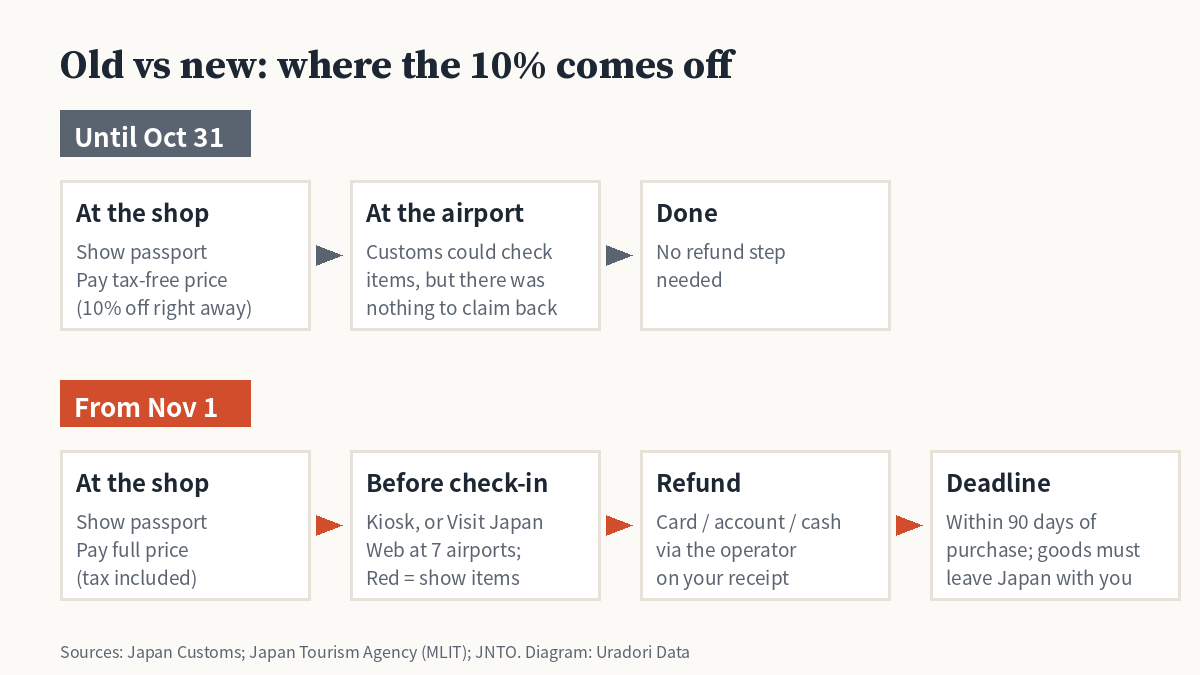
Under the old system, you showed your passport and paid the tax-free price on the spot. Under the new “refund method,” the tax is refunded only after customs confirms that the goods are leaving Japan with you. Which rules apply depends on the purchase date, not the date you fly home.
| Until Oct 31, 2026 | From Nov 1, 2026 | |
|---|---|---|
| Price you pay at the shop | Tax-free price | Full price, tax included |
| Minimum spend | ¥5,000 before tax, per store, per day | Same |
| Sealed bags for food and cosmetics | Required | No longer used, but you still can’t eat or use the items in Japan |
| Airport step | No refund to claim | Customs confirmation before check-in, within 90 days of purchase |
| When you get the 10% | Right away, at the register | After customs confirms the export |
Step by step: getting your tax refund in Japan
1. At the shop
Show your passport and pay the full, tax-included price. The shop registers the purchase with its refund operator, and that company’s name appears on your receipt. Some operators ask you to register your refund details online or with a QR code, so follow the shop’s instructions while you’re still at the counter.
If a shop sends its tax-free paperwork through a shared counter (common in malls and department stores), purchases from several stores on the same day can be added together to reach the ¥5,000 minimum.
2. At the airport, before you check in
Find the tax refund kiosks in the international departure lobby, before baggage check-in. Kansai Airport says you can only do this on the day you leave Japan, and you don’t need a boarding pass. Scan your passport. A green result means the customs part is finished. A red result means you take your purchases to the customs inspection area so an officer can look at them.
At Narita, Haneda, Kansai, Chubu Centrair, Fukuoka, New Chitose and Naha, you can do this step on your phone through Visit Japan Web, using the dedicated Wi-Fi in the departure lobby (before security). Set up Visit Japan Web before you get to the airport. The online option is only for travelers in Japan as Temporary Visitors (plus diplomatic and official status).
3. Collect the refund
How you’re paid depends on the refund operator on your receipt: back to your credit card, through another cashless method, or in yen cash at the airport. At Kansai Airport, for example, the airport’s own guide lists credit card, other cashless methods and cash.
How much do you actually get back?
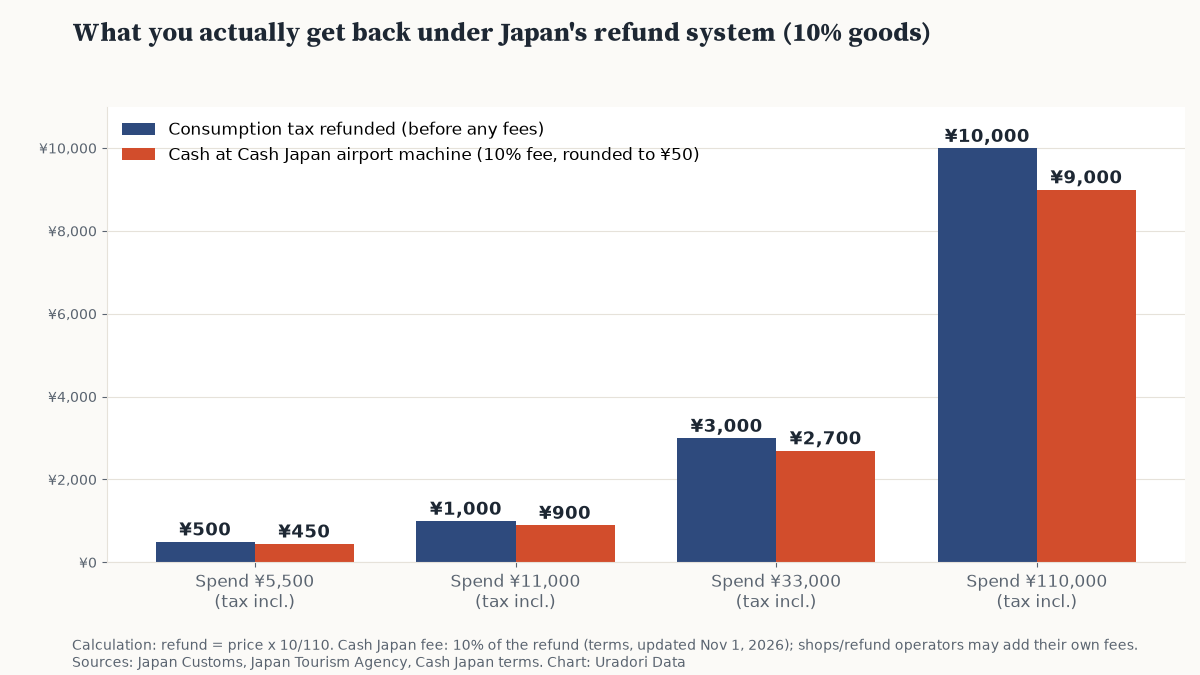
The refund is the consumption tax included in the price. For most goods that’s 10%, so the refund is the price × 10/110. Food and non-alcoholic drinks you buy to take away are taxed at the reduced 8% rate, so the refund on those is the price × 8/108.
| You pay (tax included) | Tax refunded, before fees | Cash at a Cash Japan machine |
|---|---|---|
| ¥5,500 (10% goods) | ¥500 | ¥450 |
| ¥11,000 (10% goods) | ¥1,000 | ¥900 |
| ¥33,000 (10% goods) | ¥3,000 | ¥2,700 |
| ¥110,000 (10% goods) | ¥10,000 | ¥9,000 |
| ¥10,800 (8% food, e.g. snacks) | ¥800 | ¥700 |
Fees depend on the shop and the operator. Some big retailers waive them: Pan Pacific International Holdings, which runs Don Quijote, says it charges no refund fee at its group stores, except when you take the refund in cash at the airport, where the operator’s fee applies. If you have the choice, a card refund is usually the way to avoid the cash-desk fee.
Tip: Cash Japan’s kiosks pay out up to ¥100,000 per transaction. Above that, you have to go to a staffed counter and complete extra ID checks.
5 mistakes that can cost you the refund
- Packing tax-free items in your checked bag. You need everything with you at the kiosk, and checked luggage can’t be pulled back out for the tax-free step.
- Using or eating something from a receipt. Customs checks each receipt separately. If one item is gone, the whole receipt loses its refund. If you did eat or use something, don’t use the kiosk; go to the customs counter and tell an officer.
- Arriving at the airport with little time. You have to finish the customs step, including any inspection, before boarding. Neither customs nor the airline will compensate you for a missed flight.
- Doing it at the wrong airport. If you fly domestic and then connect to an international flight, do the procedure at the airport where you actually leave Japan.
- Missing the 90-day window. Customs confirmation has to happen within 90 days of the purchase date.
Once customs has confirmed your goods, they have to leave Japan with you. If they don’t, you can be charged the refunded tax and face penalties.
One shortcut: shops in the airport’s duty-free area, past passport control, still sell at tax-free prices, with no refund step to do.
How it went in the first days
The South China Morning Post spoke to Hong Kong tour groups returning on the first day, November 1. Some told the paper the airport step took “less than a minute.” That’s one early report from one group of travelers, so we’d still allow extra time at busy airports, especially during peak travel periods.
FAQ
Is tax-free shopping in Japan gone?
No. You can still get the consumption tax back. The difference is when: after customs confirms the export at departure, not at the register.
I bought something on October 31. Which rules apply?
The refund method applies to purchases made on or after November 1, 2026. For earlier purchases, check the airport guide; Kansai Airport, for example, has separate instructions for purchases made on or before October 31.
Can I open and use cosmetics or snacks before I leave?
The special sealed bags are gone, but the rule stays the same: if you eat, drink or use tax-free consumables in Japan, you can’t get the refund for them.
Do I need Visit Japan Web?
No. The kiosks work with just your passport. Visit Japan Web is an alternative at 7 major airports that may save you a queue.
Read next: more practical Japan guides are coming to our Travel Basics section.
Sources (checked November 4, 2026, JST)
- Japan Customs: Tax Exemption (Refund) Program for Foreign Visitors
- Japan Tourism Agency: Tax-free shopping page for travelers (English)
- JNTO: Everything You Need to Know: Japan’s New Tax-Free Shopping System (July 20, 2026)
- National Tax Agency: Image of the refund method (PDF)
- National Tax Agency: Reduced consumption tax rate (Japanese)
- Digital Agency: Visit Japan Web tax refund announcement (November 2, 2026)
- Kansai International Airport: Tax Refund Information
- Cash Japan: Airport refund service terms (updated November 1, 2026)
- PPIH (Don Quijote) press release on refund fees (October 5, 2026, Japanese)
- South China Morning Post (November 1, 2026)
- Executive Traveller (November 2, 2026), used to cross-check the fee example
Rules and fees can change. If you spot an error, please let us know and we’ll fix it.